> ## Documentation Index
> Fetch the complete documentation index at: https://support.locker.io/llms.txt
> Use this file to discover all available pages before exploring further.
# I forgot my Master Password
> Steps to recover access or handle a forgotten Master Password
Locker operates on a **zero-knowledge** architecture, ensuring that you are the **ONLY** person who knows your Master Password. For security reasons, Locker does not store and cannot recover this password for you.
Before resorting to the last option of deleting your account, try the following methods:
## 1. Check other devices
If you still have an active session on a mobile app or browser extension, you may be able to find the password you saved.
Open Locker on a device you are currently using.
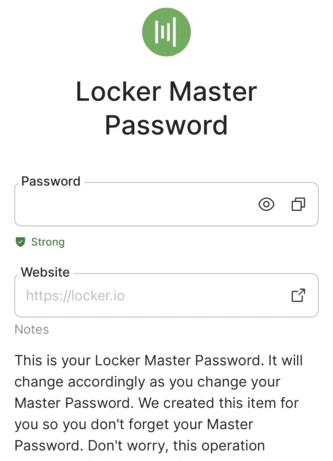
Check your password list for an item named **Locker Master Password**. If it exists, open it to view your password.
 ## 2. Use your password hint
If you set up a password hint when creating your account, Locker can send this reminder to your email.
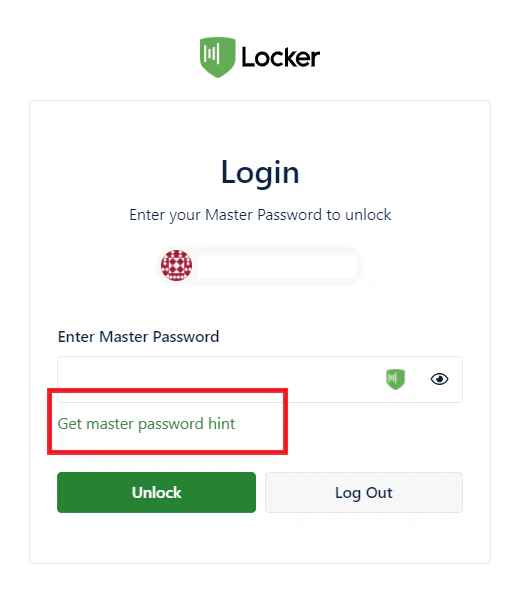
* **How to do it:** On the Master Password entry screen, click the option to request a hint. Check your inbox for the reminder.
A password hint is a phrase that helps you recall your actual password. We strongly recommend setting one up in your Account Settings.
## 2. Use your password hint
If you set up a password hint when creating your account, Locker can send this reminder to your email.
* **How to do it:** On the Master Password entry screen, click the option to request a hint. Check your inbox for the reminder.
A password hint is a phrase that helps you recall your actual password. We strongly recommend setting one up in your Account Settings.
 ## 3. Emergency Access (Premium only)
If you previously set up the **Emergency Access** feature, you can ask your trusted contact for help:
* **Viewer permission:** Your contact can log in and read your important data on your behalf.
* **Takeover permission:** Your trusted contact can reset a new Master Password for your Vault.
***
## Last resort: Delete your account
If none of the above methods work, the only option is to delete your current account and start over.
This action will permanently delete all existing data in your Vault and cannot be undone.
[How to delete your account and start over](/en/locker-general/get-started/delete-locker-account)
## 3. Emergency Access (Premium only)
If you previously set up the **Emergency Access** feature, you can ask your trusted contact for help:
* **Viewer permission:** Your contact can log in and read your important data on your behalf.
* **Takeover permission:** Your trusted contact can reset a new Master Password for your Vault.
***
## Last resort: Delete your account
If none of the above methods work, the only option is to delete your current account and start over.
This action will permanently delete all existing data in your Vault and cannot be undone.
[How to delete your account and start over](/en/locker-general/get-started/delete-locker-account)