> ## Documentation Index
> Fetch the complete documentation index at: https://support.locker.io/llms.txt
> Use this file to discover all available pages before exploring further.
# Business Plan Renewal
> Guidelines on how the Business Plan renews and how to track the billing schedule via the Admin Dashboard.
Subscriptions for the Business Plan renew automatically on a monthly or yearly basis, depending on the duration chosen by the Business Primary Admin or Admin.
To ensure on-time payment and avoid service interruption for your organization, it is recommended to maintain a valid payment method as the billing date approaches.
If Locker cannot process the payment for any reason, the business account will be frozen after **3 payment attempts**. The Primary Admin will receive a notification via email.
**Note:** Locker does not store any payment information at our end. We utilize secure services like Stripe, Apple Pay, and Google Pay to process all transactions.
***
## Check Renewal Date
The subscription renewal date is available within your business’s **Admin Dashboard**.
Go to [enterprise.locker.io](https://enterprise.locker.io/) and log in to your account.
On the left sidebar, click `Settings`.
On the `Overview` tab, you can view the renewal date and the upcoming amount to be charged.
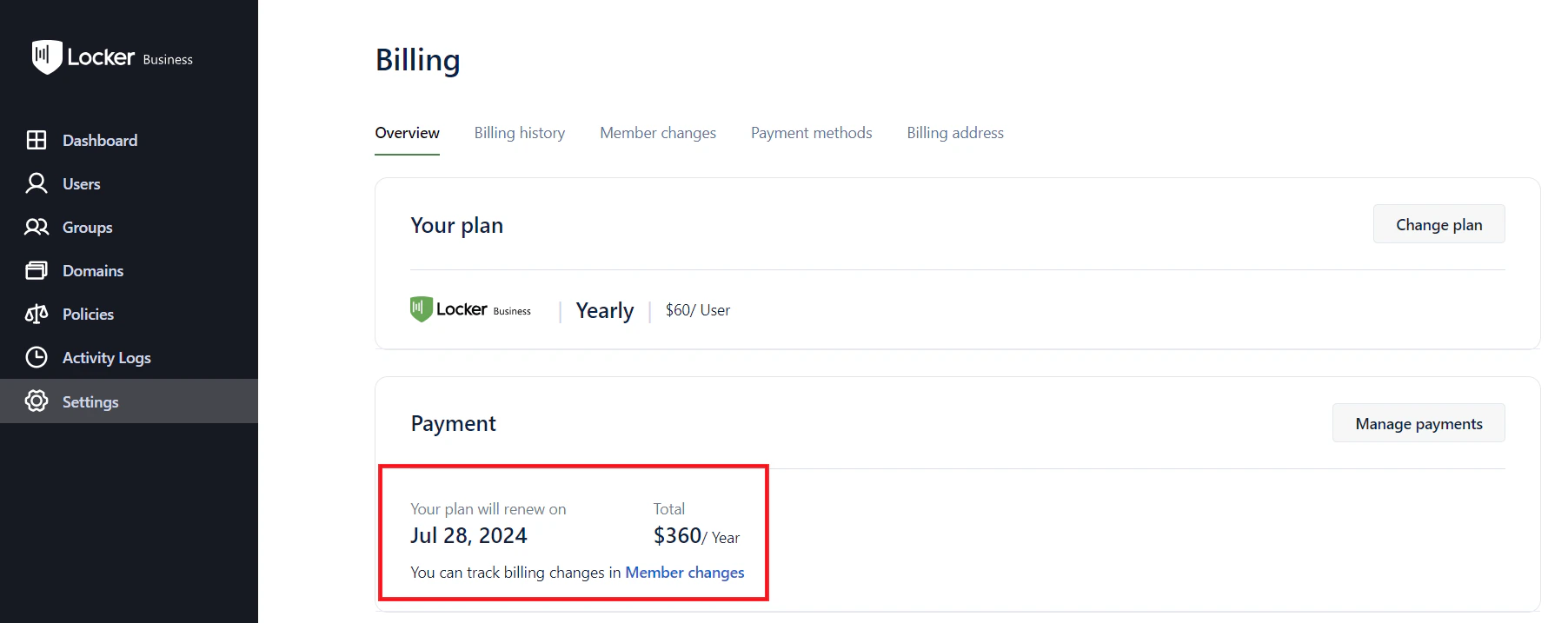 **Note:** Access to the Admin Dashboard is restricted to the **Primary Admin** and **Admins** only.
***
## Change Payment Method
You can update your organization's payment method at any time to ensure continuity of service.
Learn more about supported payment methods and how to update them for your business.
**Note:** Access to the Admin Dashboard is restricted to the **Primary Admin** and **Admins** only.
***
## Change Payment Method
You can update your organization's payment method at any time to ensure continuity of service.
Learn more about supported payment methods and how to update them for your business.